
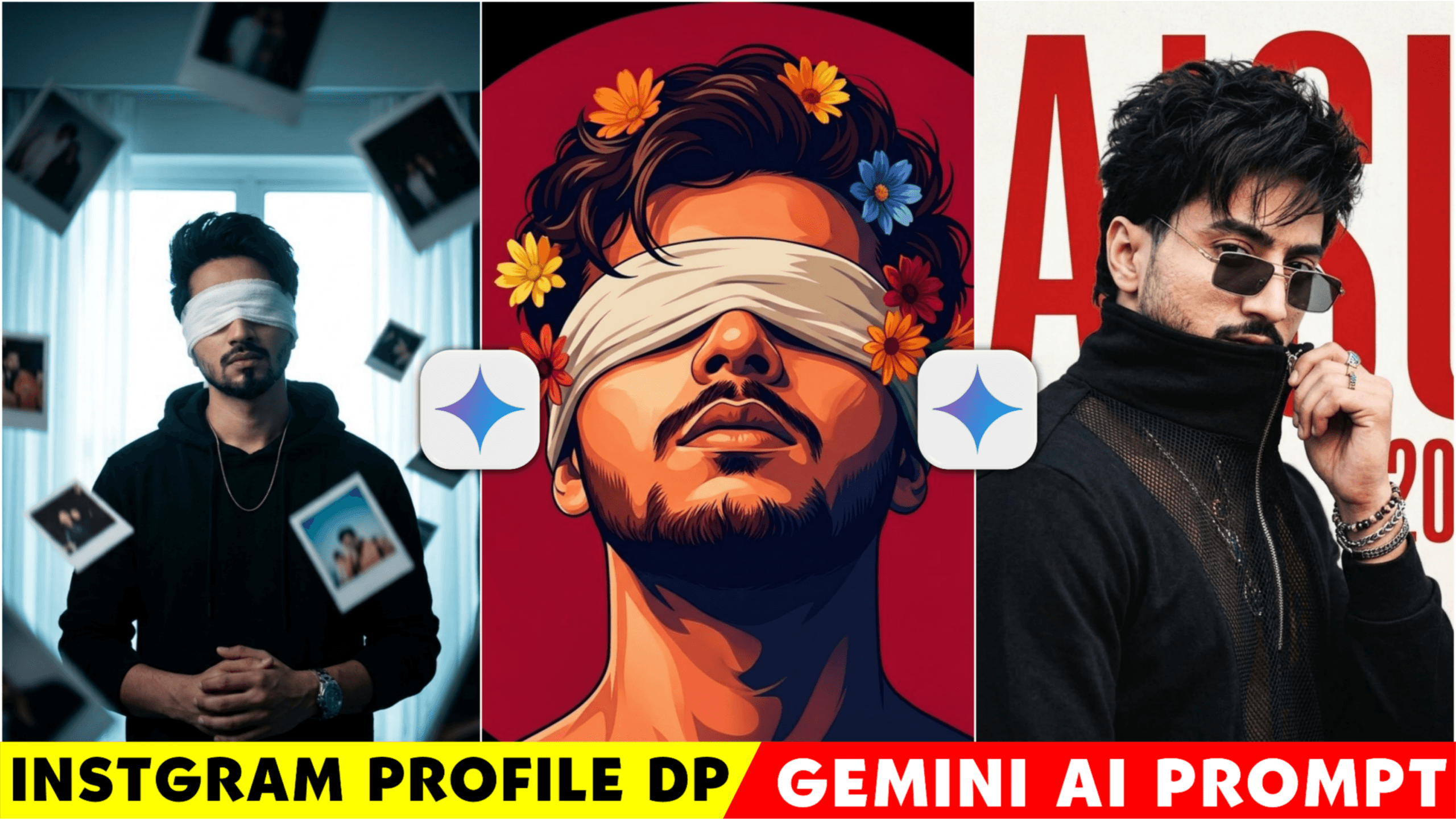
How To Create Instagram Dp Photo Google Gemini Prompt – Hello everyone. These days, such dp photos are very viral. In today’s post, I will show you how you can make such a trending dp photo. I have some prompts with which you can make such a viral dp very easily in one click.Earlier, when we wanted to make a profile photo, we had to edit it for a long time, take photos, and spend some money. But now, did you know that with AI, you can create a stylish DP for your Instagram profile ?
If you add such photos to your profile, your profile will look aesthetic. In this post, I will show you five stylish DP prompts that you can apply to your photo to make a trendy DP . Currently , such DPs are trending on Instagram. I will guide you step by step on how to create a DP with the help of Google Gemini AI.
How To Create Instagram Dp Photo Google Gemini Prompt
In the world of social media today, making a strong first impression is crucial. Your profile picture plays a significant role in how others perceive you, especially on platforms like Instagram. Therefore, it’s essential to have a professional or visually appealing display picture. In the past, people would spend considerable time and money taking and editing photos for their profiles.
However, with the advent of AI technology, creating an impressive display picture has become much simpler. By using the Gemini prompt, you can easily generate a stunning profile picture by just copying and pasting a specific prompt. When such a photo is created, sometimes you may not like the face expression. For this, you can apply a trick. After creating the photo, what kind of face expression do you want? Then wait for some time and the photo will be created as per the face expression you want. I’ll guide you through the process step by step, so make sure to read the entire article to catch all the details and not miss any important steps.
How To Use Dp Photo Google Gemini Prompt ?
Friends, if you have understood the article, then I will teach you how to create these photos using Google Gemini. Google Gemini is an app with which you can create any type of photo. And you can promote and enlarge any photo. Let’s tell you friends how you can easily create this profile dp with the help of gemini prompt. Since we are not using any editing app to make Instagram dp, we are using Google Gemini, so you will have to see some editing steps in our Google Gemini. Don’t think that editing is very difficult.
At first you have to open the Google Gemini app, you can download or use it for free. When you open the app, you will have to create an account to create photos. If you do not create an account, you can ask questions, answers in Gemini, but you will not be able to create photos, for that you will have to create an account, which you have to do with the help of a gmail id. Now we have to add the photo of the model we have and for that we have to click on the plus bottom which will be seen below. Click on that and upload the photo. Now you have to paste the promo that I have given you. By clicking on the link, you will get the promot.
After pasting the promot if you want to make the photo realistic, then you have to turn on both create image and pro feature. After completing all these steps we have to click on generate bottom you will see an arrow bottom click on that. Now wait for 1-2 minutes your Instagram dp profile photo will be created. In this way we have to create the photo.
About This Trending 4 Photo?
- The first photo is a high-fashion editorial poster. There will be a model in this photo. Behind the model will be a premium font and your name will be written in the font. What you write depends on you. And it will be written on a simple background.
- The 2nd photo is a cinematic illustrated dp photo style with a cotton filter added to it. The photo will have a white cloth tied around the eyes. And some flowers will be seen in the hair. All this has created an aesthetic dp. This is my favorite among all of them. Don’t forget to tell me which one you like in the comments.
- Now the photo in number 3 is a side-profile dp photo, it is an attitude dp stylish type photo. The model in the photo will be in black colour and the back will be in dark white or brown, black colour.
- This time the 4th number photo is a moody portrait photo. This photo looks cinematic. In the photo you will see your model standing in front of a Prada and a cloth is placed over her eyes. And there are some photo prints floating around the model’s body. A moody colour tone has been applied to the entire photo.
Conclusion
Just creating photos is not enough, you have to learn some editing skills for yourself, and how long will you generate photos by copy and paste like this? Learn something yourself, don’t copy. Suppose I have given 4 prompts, if you want, you can change the prompt a little by adding some of your own ideas. In this way, you will gradually learn about AI photo. If you learn like this, later you will not have to search, after looking at the photo you will tell what its prompt will be. Friends, this was today’s article where I told you how to create such a dp photo with the help of gemini prompts. I have given you not one but many prompts that you can use easily.
Now on social media, first impression is everything. If your first impression dp is good, then your page can also look professional. Share this article with your friends so that they can also create such photos. If you have any difficulty in creating photos, tell me in the comments.
Hey friends I am ishan biswas, ami ishan prompt er founder. I post all types of articles like Capcut Template,Ai Photo Prompt, Lightroom photo editing,Vn Template on this website. I try to always post high quality type articles. After seeing the articles I have given you can post them on your social media.Keep visiting my website to see such trading trading articles.


Wow, incredible blog layout! How long have you ever been running a blog for?
you made blogging glance easy. The entire look of your site
is excellent, as smartly as the content!