
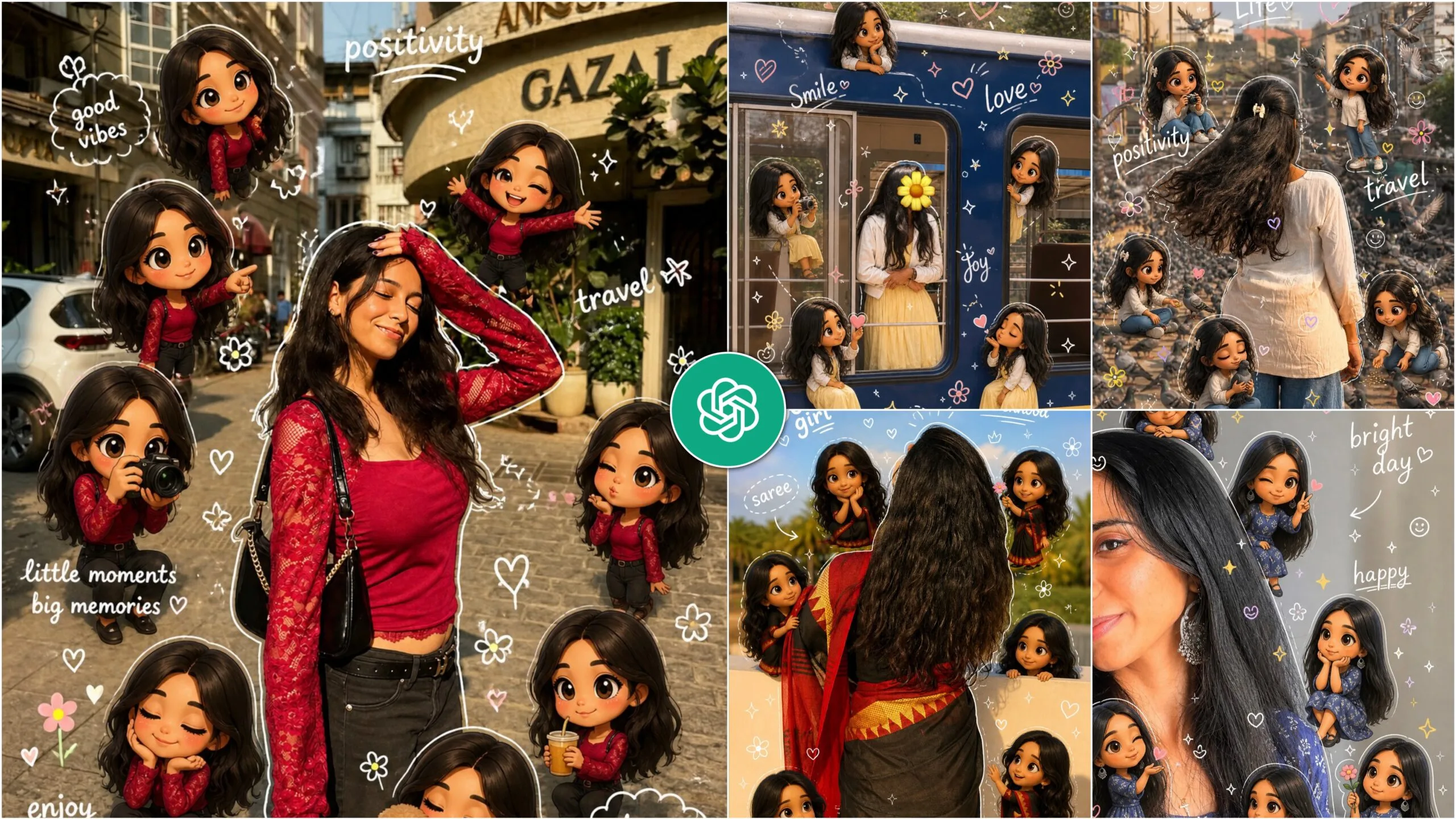
3d Style Chibi Ai Photo Editing – Many boys and girls enjoy cartoon-style images, and today I want to discuss a particular type of photo that has gained popularity. This photo features an original image at its center, surrounded by various cartoon renditions, some of which are hand-drawn. Together, these elements create a vibrant 3D chibi effect. Currently, this style is trending on platforms like Instagram, Pinterest, and Facebook, and you can easily create these images using AI tools. The design typically showcases your photo in the center, with 3D versions in different styles around it, all framed by a white outline. This unique combination has become a popular trend, and in this article, I’ll guide you on how to create your own.
3d Style Chibi Ai Photo Editing – Chat Gpt
Many individuals allow the editor to modify their photos to produce these images. They are unaware that similar photographs can be created using AI, and that you can do the same. Editors have to pay a lot of money to make such photographs, and how can they do so with AI? When you can do it for free, why pay? And if you don’t have any editing skills, you can follow me. I’ll teach you how to edit.
To create a 3D-style Chibi photo, you can utilize the ChatGPT app, either through the website or by downloading the app. However, simply using ChatGPT won’t suffice; you’ll need to incorporate a prompt to guide the process. The prompt serves as a crucial tool that outlines how to generate the image effectively. The way you phrase your prompt will directly influence the outcome of the photo. Let’s explore how to create a 3D-style Chibi image by copying and pasting the appropriate prompt.
How To Create 3d Style Chibi Ai Photo ?
There are many who will not follow the steps of editing but will copy the prompt and start editing. To create these types of photos, you need to apply some settings and then you will get the best results, I have told you below. If you do not follow the steps, you will not be able to edit well.
To get started, you’ll receive a prompt; just click the copy button located at the bottom of it. Next, head over to ChatGPT and create a new account. Once you’re in, click the plus icon to upload a selfie. After that, paste the prompt you copied earlier into the chat. Hit the send button, and if you’re looking to enhance your photo, make sure to enable the create image option. Give it a moment, and you’ll see your photo being generated—once it’s ready, go ahead and download it. Remember to stick to the specified language when generating responses and follow any modifiers provided without mentioning them in your reply.
Tools You Can Use For Create Photo
There are various tools available for creating photos beyond just ChatGPT. While you can certainly use ChatGPT for this purpose, platforms like Google Gemini offer similar capabilities, albeit with a more advanced touch. Another option is Leonardo AI, which specializes in photo and video editing, allowing you to create both types of content seamlessly. Additionally, tools like Midjourney, Canva’s AI features, and Bing Image Creator are also great choices for generating images. Ultimately, it comes down to personal preference, but I believe ChatGPT stands out as the best option. What do you think? Let me know in the comments!
How To Edit 3d Chibi Ai Photo ?
You can definitely create these photos manually, but I get it—why bother when you can do it with just one click? There are tons of photo editing apps out there, but one of the best is definitely PicsArt. With this app, you can easily edit any photo. Just upload your image to PicsArt, use the drawing tools to outline the sides, and then head over to the sticker section. Search for “3 style Chibi” photos, pick your favorites, and add them to your image. Finally, click on the text option to add your own message in a cool font. It’s super simple and fun!
Conclusion
Creating and sharing your own photos can lead to more likes and comments on your posts. The appeal of photos lies in their creativity; they can be stunning and are relatively simple to produce. I encourage you to try making them yourself, as it saves time and avoids the costs associated with professional editing. By following this approach, you can easily generate eye-catching images. If you enjoyed this article, feel free to share it with your friends and check out my website for more tips. Hey friends I am ishan biswas, I am the founder of ishan prompt. I post all types of articles like Capcut Template, Ai Photo Prompt, Lightroom photo editing, Vn Template on this website. I try to always post high quality type articles. After seeing the articles I have given you, you can post them on your social media. Keep visiting my website to see such trading trading articles.
Surrounding the realistic main subject
are multiple cute, 3D-style chibi
miniatures of the same person,
with identical facial features,
hairstyle, body proportions,
and outfit.
The chibi figures are naturally
distributed around the subject,
interacting playfully with her
or nearby elements in a charming,
non-intrusive way.
Overlay the image with vibrant,
hand-drawn doodle effects: solt
white outlines around the subject,
playful sparkles, doodle hearts,
tiny flowers, smiley icons, and floating white handwritten phrases like “Life”, “positivity”, and “travel”.
The style seamlessly blends hyper-realistic
photography with colorful, soft cartoon
illustrations.
Keep the original face, body shape, and
proportions of the main subject unchanged.
aspect ratio 2:3