
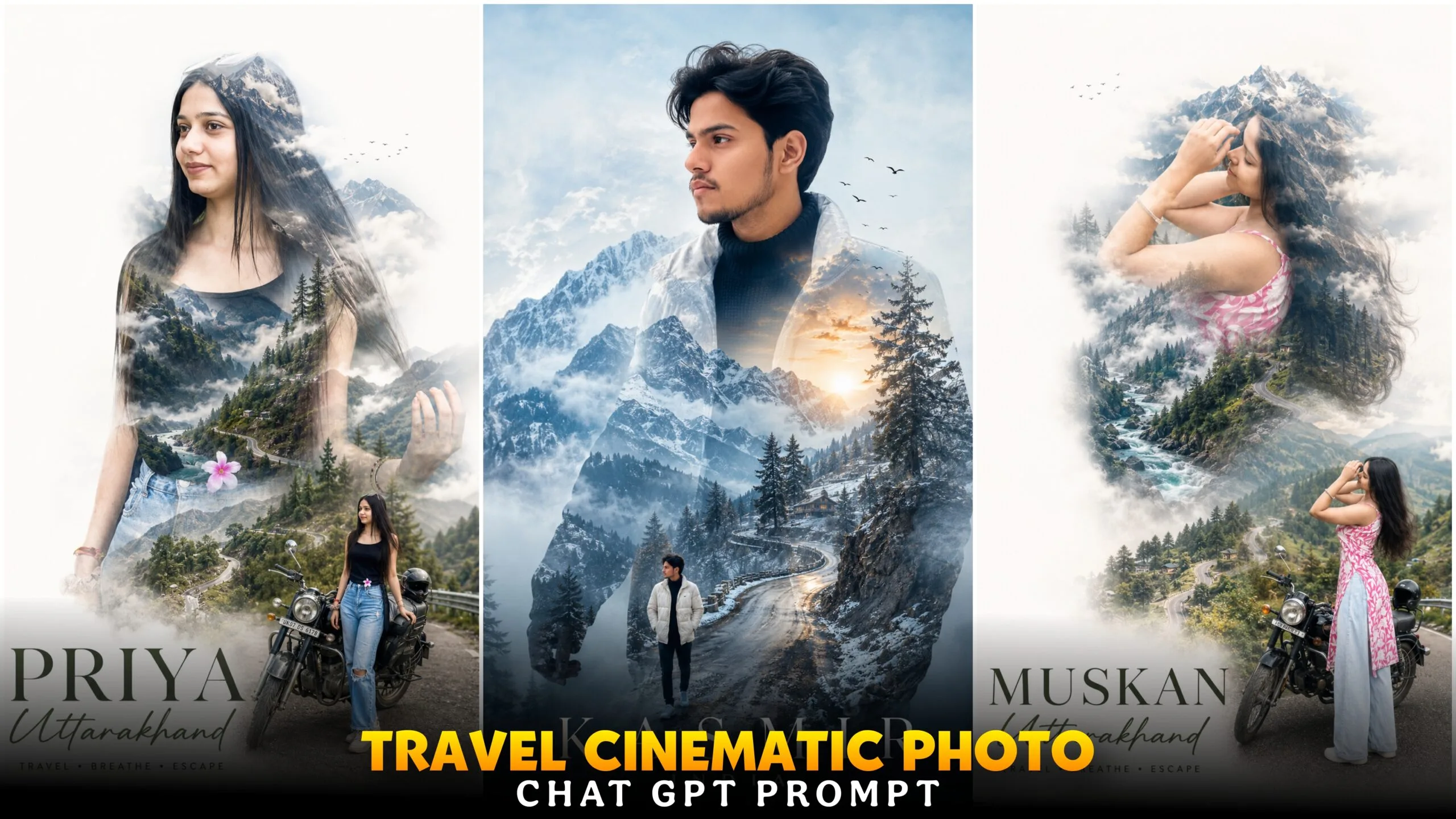
Travel Cinematic Double Exposure Ai Photo Editing –There are many people who love to travel. They only go to famous places. While traveling, they shoot photos to keep them in albums or upload them on social media. But the photos look very boring because there is nothing unique in the photos that will make you like them. I am posting this article for you so that you can convert a boring travel photo into a cinematic photo. You can use a boring PHOTO you click and convert it into such a viral cinematic photo.
We will create such photos from google gemini ai or you can also take the help of any other ai website. If you want to make such a cinematic photo, then definitely watch the article till the end. Currently, such a cinematic Double Exposure Travel Photo is very viral on social media. Whoever is going to travel somewhere is creating such a photo with the help of Google Gemini. Let me explain to you a little. Suppose I went to Manali, Darjeeling, Asaam for a walk and clicked a photo there and when I came home, I saw that the photo looks very boring. What did I do with the photo? I uploaded it to Google Gemini and wrote a secret promo for it. In the promo, I wrote the name of the place where I was going to walk and Google Gemini made me a cool cinematic travel photo.
Travel Cinematic Double Exposure Ai Photo Editing
These photos are very viral because everyone travels every day and these photos look very attractive. Because there are some in these photos that no one has uploaded till today. This photo is a double exposure photo type. Before double exposure photos were normal type, one photo was half towards the sky and the other photo was standing on the road, there was a little fade effect in the photo. Now that has completely changed. Now what you will see in the photo is this. Your half photo will create a shadow in which your full photo will be in it and there will be a white shadow on the side of the photo and you will see some birds flying along with it.
Now if you go to Kashmir, Kashmir will be written below and if you want to write something extra, you can write that too, for example, your name, all these things are combined to create such a travel photo. If you edit such a photo with a PC or mobile phone, it will take hours but you will not be able to make such a photo. And after the advent of AI, you can make it in just a few seconds. With the help of a single promot. I am giving you some promos below that will help you to make different different photos.
How To Use Travel Cinematic Double Exposure Ai Photo Prompt?
We are not editing the photo with any editing app, we will use AI app. There are many AI apps, I have chosen Google Gemini app, with the help of this app, we can create this travel photo in just a few seconds. If you do not follow the editing steps, the photo will not be created perfectly.
First of all, we will open the Google Gemini app, there you will see some options that you have to turn on. Create image and pro, otherwise you will not create a perfect photo. Now you have to upload a high quality photo. Add a photo in which the post face is showing. Then see how you will create the photo below, now you copy the prompt and paste the prompt in Google Gemini. Then click on send bottom. Wait for a while, then your photo will be generated. Open the photo and download it. If you follow these few steps, you will not have any difficulty in generating your photo.
Best AI Tools for Double Exposure Editing ?
Apart from Google Gemini, there are some apps or websites that you can use to create photos that you can promote. I am talking about 2 apps, if you have downloaded these on your phone, then you can use these websites. I will tell you another app with the help of which you can increase the photo quality, you can upload that photo in HD to chat gpt, google gemini leonardo ai website, this will generate good photos.
CHAT GPT –
This is an app with which you can generate any type of photo in high quality. Here you will see the original type of photo, there will be no face change. In this app you can generate 6-7 photos daily. Apart from generating photos, chat gpt help will reply to you with any question you may have.
Leonardo Ai:- The interface of this website you are looking at is a little different, here you can create photo and video with the prompts. To create a photo, you must create an account, otherwise you will not be able to generate photos. Now you will see a plus option at the bottom, click on it and add photos, now write the promo in the box below, what kind of photo you want. Again, there is a generate bottom, click on that. Then the photo will be created. Here you will see text to video, image to video and some other features, you can use those too.
REMINI AI:- Now I will talk about the website or app, here you can make photos hd and create AI photos. To create photos, you have to open the Remini app before you go to sleep. Click on AI edits. Now upload the photo and paste the prompt. And generate it and the photo will be created. Open the photo and download it. Now if you want to make the photo hd, click on the Enhance option there, now upload the photo and click on enhance photo, then you have to convert the photo to high quality. If you use this app, many ads will be shown, this is a problem.
Conclusion
If you create these photos, you don’t have to explain with a caption where you went to travel. If you create these photos, they will understand. Because the photo is written in the details of where you went and what the place looks like. Everything is written in the details in these photos. By watching this article, you learned how to create such travel photos. And there are some websites through which you can generate AI photos and also make HD photos. We could have done this edit manually. I did it with the help of AI because it is an easy method. Since this travel poster photo is going viral, create it. Anyone can create these photos for free.
Hey friends I am ishan biswas, I am the founder of ishan prompt. I post all types of articles like Capcut Template, Ai Photo Prompt, Lightroom photo editing, Vn Template on this website. I try to always post high quality type articles. After seeing the articles I have given you, you can post them on your social media. Keep visiting my website to see such trading trading articles.
https://shorturl.fm/b8CTx